
Two solutions in one app: fleet management and route optimisation

One app for route optimisation, car bookings, fleet management, travel orders and reports.

Plans every van’s route in seconds, with customer time windows and vehicle capacity.

Free demo, no card needed: 1 vehicle with route optimisationWatch the 1-minute video

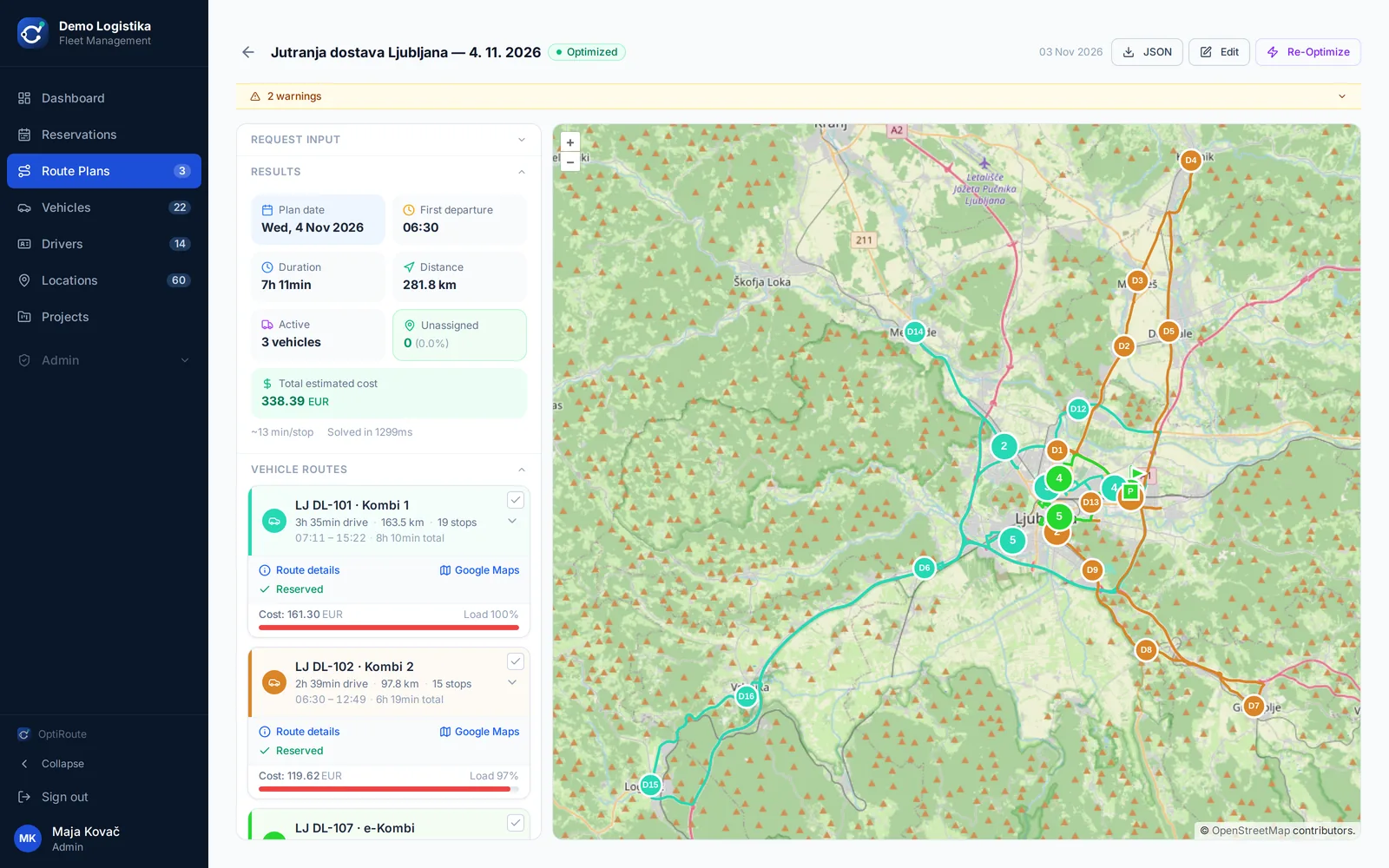
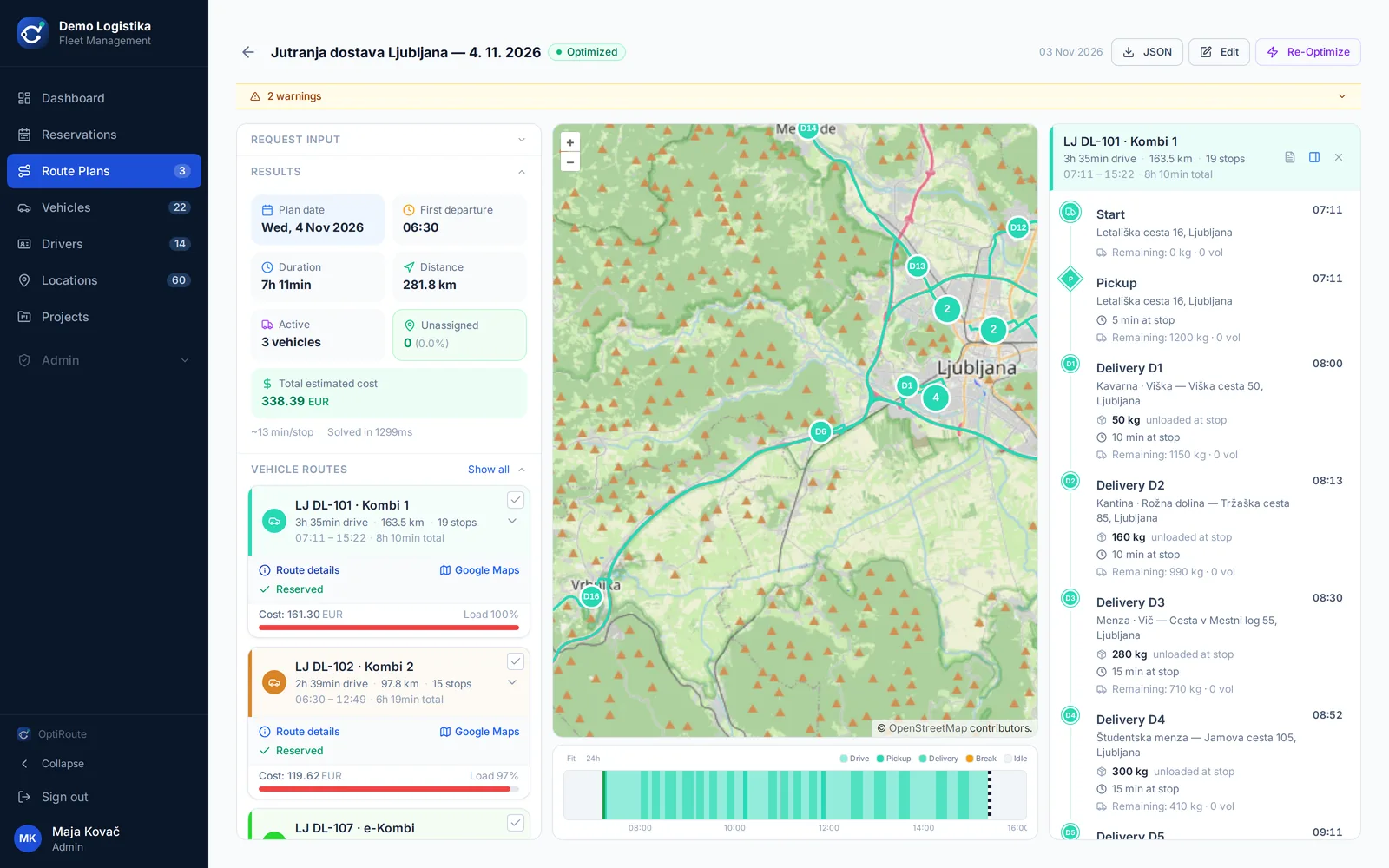
Delivery route plan for Ljubljana in the OptiRoute app
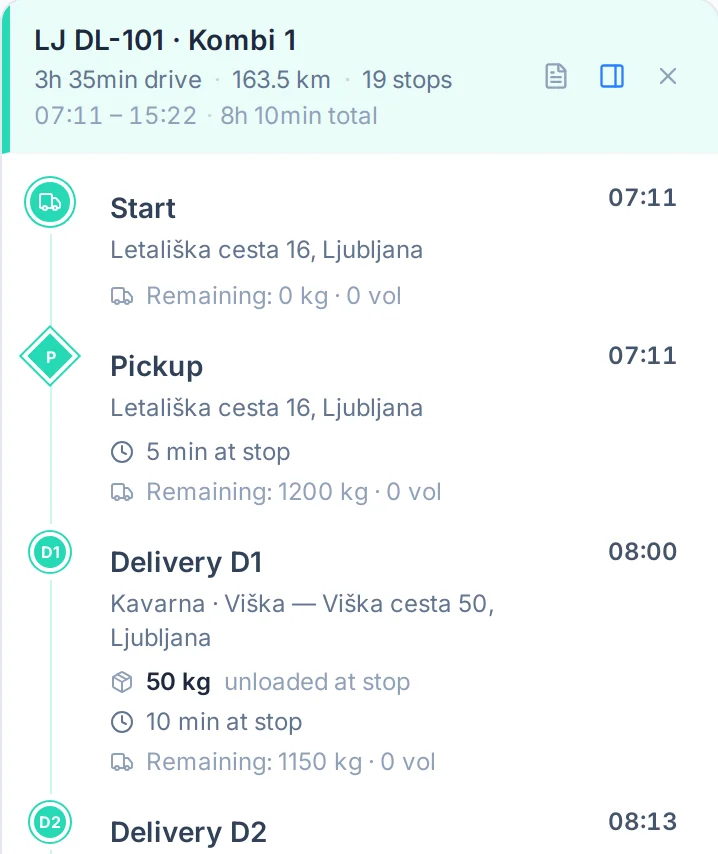
Route details for Van 1: stops, arrival times and remaining capacity
  • Local support from Slovenia
  • Data on servers in the EU
  • No GPS devices or hardware
  • Monthly, no lock-in

Two solutions, one app

Pick one solution, or both.

OptiRoute is made of two solutions. Use fleet management on its own, or add delivery route optimisation as well.

Solution 1

Fleet management and control

An overview of every vehicle and its status. For company cars and your whole fleet.

  • Vehicle availability and bookings, no double bookings
  • Mileage and usage history
  • Travel orders created from bookings
  • CO₂ emissions per vehicle
  • Alerts for registration, insurance, vignettes and driving licences

€6per vehicle per month

More about fleet management
Includes Solution 1

Solution 2

Delivery route optimisation

The system calculates the best routes to your customers. For companies that deliver every day.

  • Takes available vehicles, their capacity and customer time windows into account
  • Works out whether one vehicle can do every delivery or the work is better split across several
  • Optimise for the lowest cost or the shortest time
  • Re-plan during the day when something changes
  • Route for the driver as a PDF or in Google Maps

€26per vehicle per month

More about route optimisation

Which do you need?

  • Fleet only

    The lower-cost option if you don’t deliver to customers. No route optimisation.

  • The full package

    Both solutions. Vehicles that deliver get route optimisation, the rest stay on Fleet only.

Calculate your price

Sound familiar?

The day never goes to plan. OptiRoute re-plans it.

Each of these situations is filmed in the real app, with a stopwatch.

  1. 06:05Routes

    A driver calls in sick. Nobody is taking his deliveries.

    Remove the van, click Calculate. All deliveries move to the remaining vans, with time windows and capacity respected.

  2. 17:40Routes

    A customer needs a delivery tomorrow before 9:00.

    Add the shipment and recalculate. You see which van takes it and the exact arrival time while still on the phone.

  3. 12:00Routes

    “Why didn’t we get our goods?” The order never made it onto a route.

    The exact reason in one place: time window, capacity, refrigeration or number of stops. Fix it and recalculate.

  4. 08:30Fleet

    Two colleagues, one company car. One of them misses a meeting.

    Every vehicle on one weekly schedule. An overlapping booking is rejected and you pick a free car.

  5. 07:15Fleet

    The insurance expired last week. The car is booked for today.

    A warning 30 days ahead. On expiry the vehicle goes out of service automatically and the booking won’t go through.

  6. Month-endTravel orders

    Accounting is waiting for travel orders and km per project.

    The travel order comes from the booking. Km per project, vehicle and driver is one CSV export.

One app, two solutions

What you get in each solution

Both solutions work in the same app, with the same vehicles and drivers. Route optimisation includes everything in Fleet.

Solution 1

Fleet management and control

€6 per vehicle per month
Fleet

Who has the car? One view.

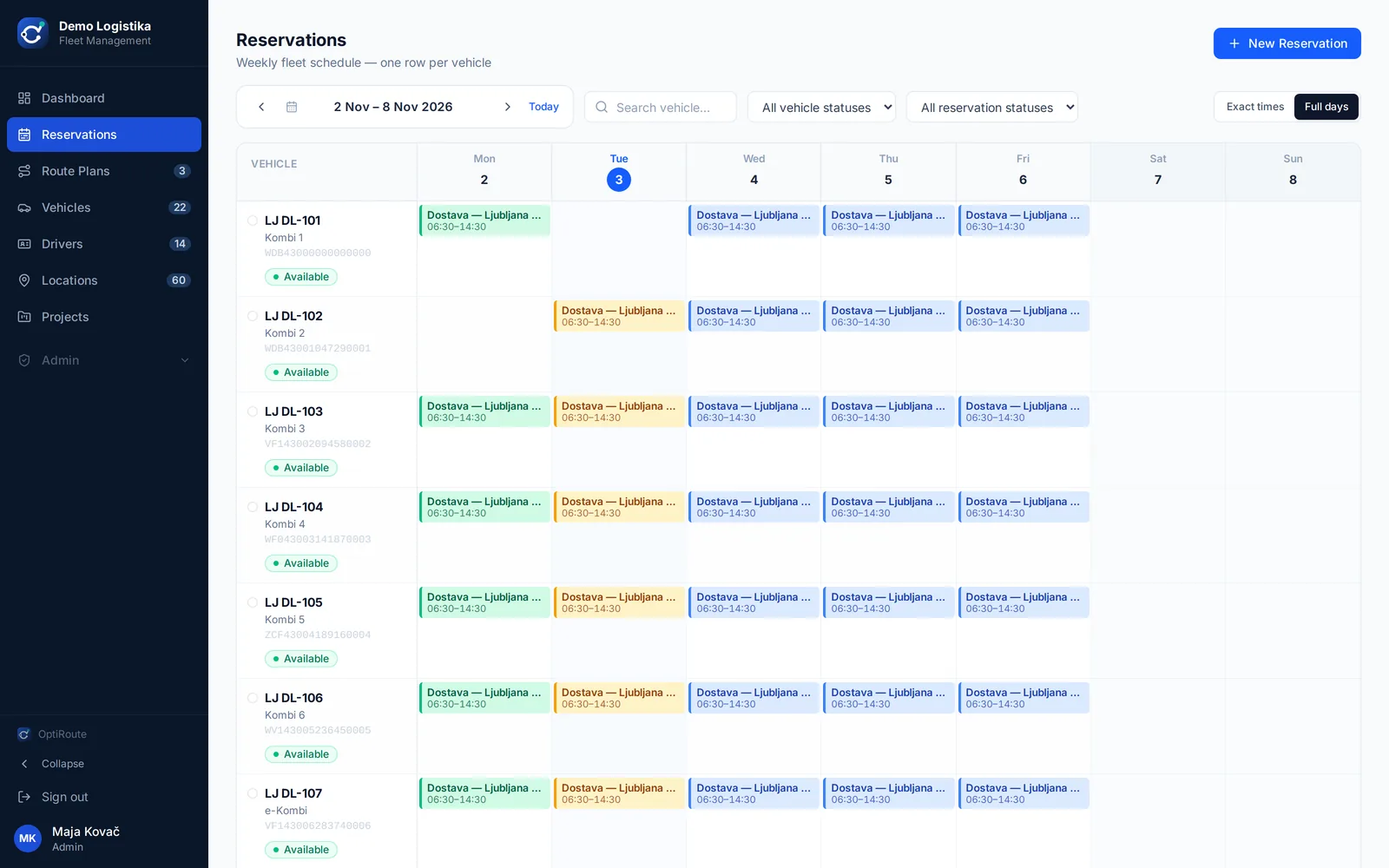
Every vehicle on one weekly schedule. Colleagues book themselves, and double bookings are impossible.

  • Registration, insurance and vignette warnings
  • Vehicles with expired documents can’t be booked
  • Start and end odometer, fuel, damage on return
  • Driving-licence expiry
Weekly vehicle booking schedule
Travel orders & reports

Month-end without retyping

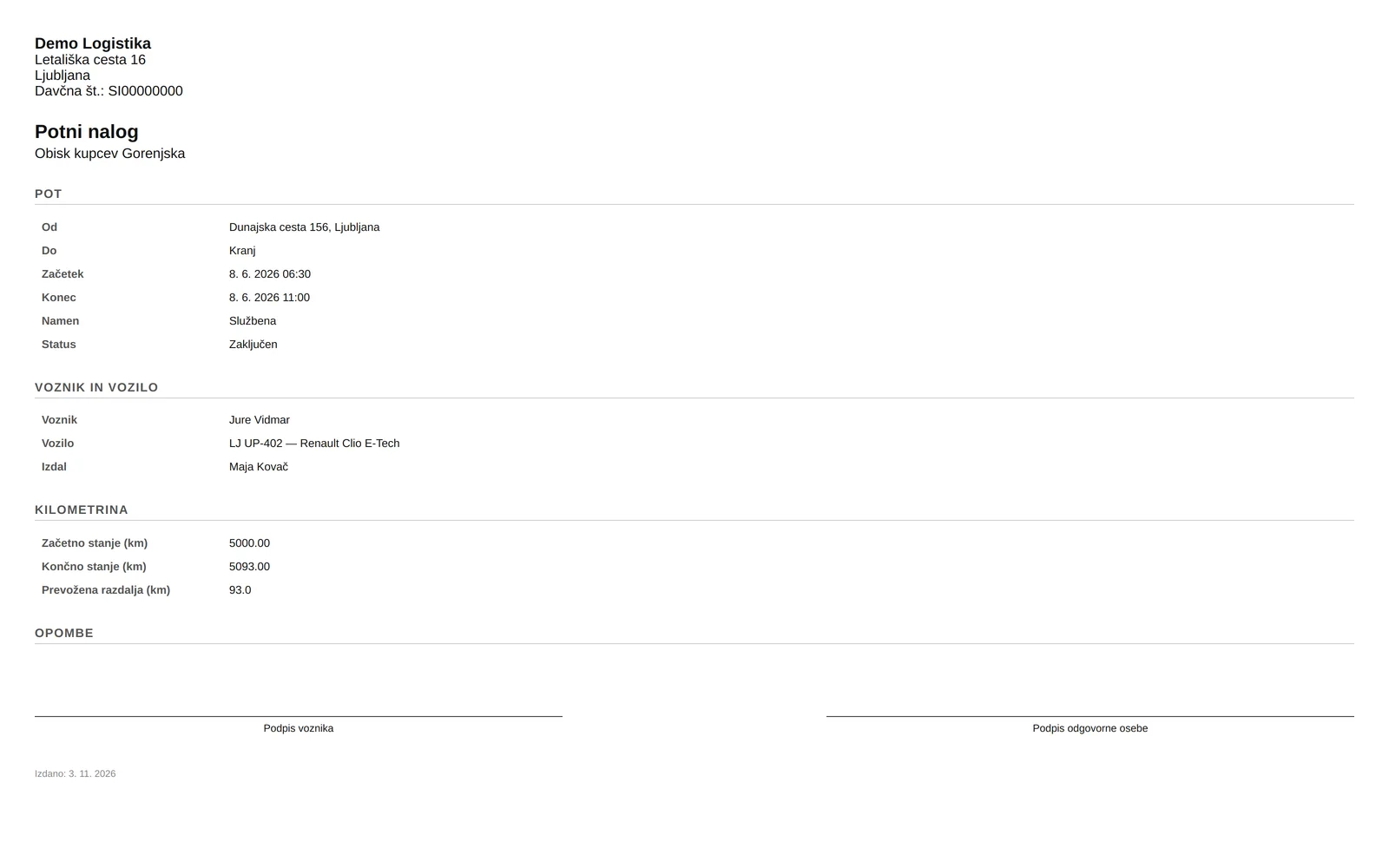
The travel order (potni nalog) is created from the booking, with kilometres and project. Reports are ready for accounting.

  • Kilometres and trips per project (cost centre)
  • Vehicle utilisation and driver activity
  • CO₂ per vehicle with EU factors (WLTP)
  • CSV export for accounting
Travel order generated from a booking

Solution 2

Delivery route optimisation

€26 per vehicle per month
Routes

Tomorrow’s plan in seconds, not hours

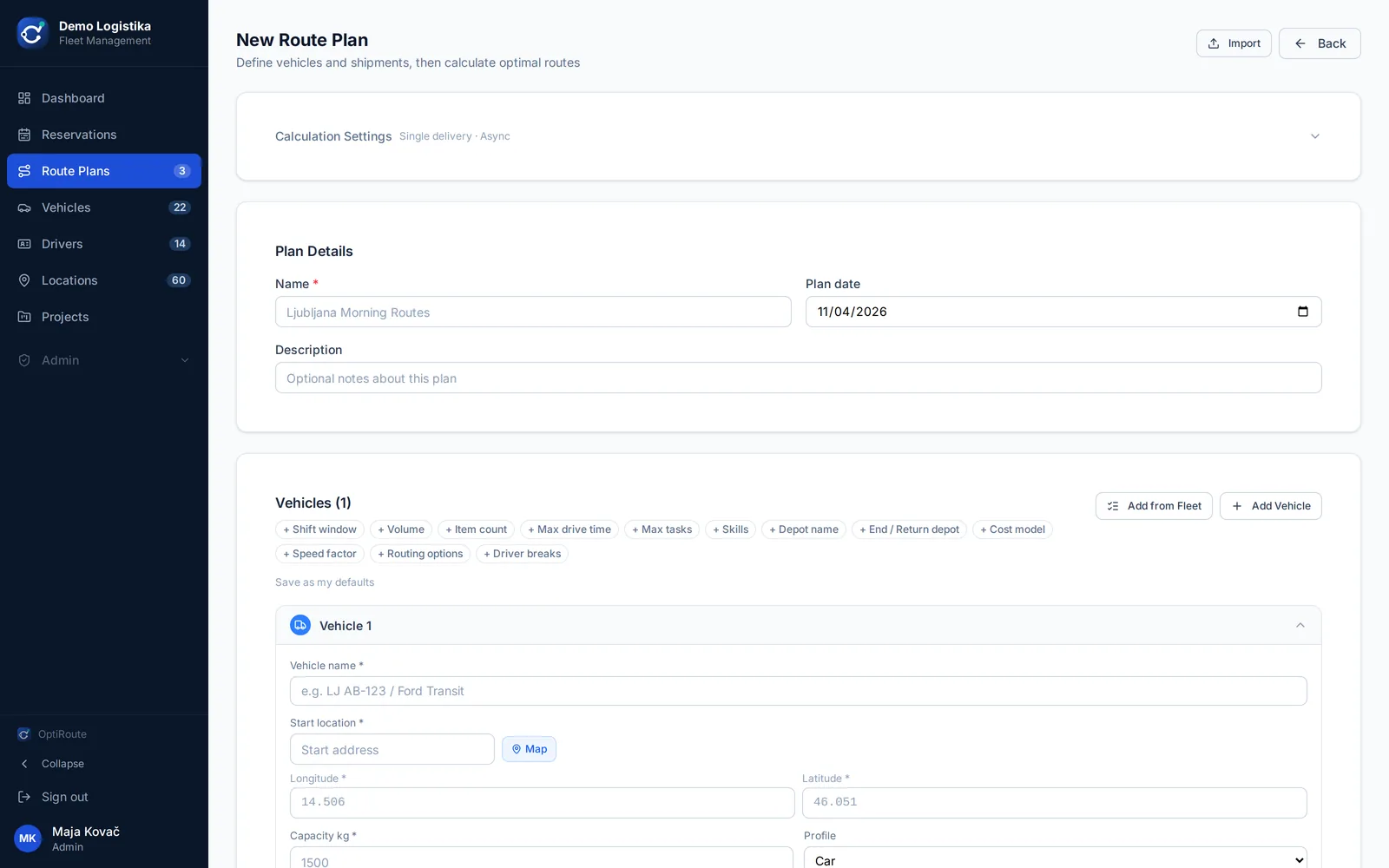
Import the orders, pick the vehicles and click Calculate. The optimiser takes into account everything your dispatcher keeps in their head.

  • Capacity (kg, volume, items) and customer time windows
  • Vehicle skills: refrigerated (ATP), tail lift …
  • EU 45-minute driver break, vehicle shifts
  • Cost of every route from the vehicle’s cost model (fixed, km, hour)
  • Move stops by hand and the times recalculate
New route plan: orders and vehicles
Routes

The driver gets the route, you get the overview

For every vehicle: stop order, arrival times, kilometres and cost. Print the route as a PDF or let the driver open it in Google Maps on the phone.

  • Re-plan mid-day when something changes
  • The reason for every unassigned shipment
  • CSV and GeoJSON export
Route details with arrival times

Included in both solutions

Warnings before it’s too late

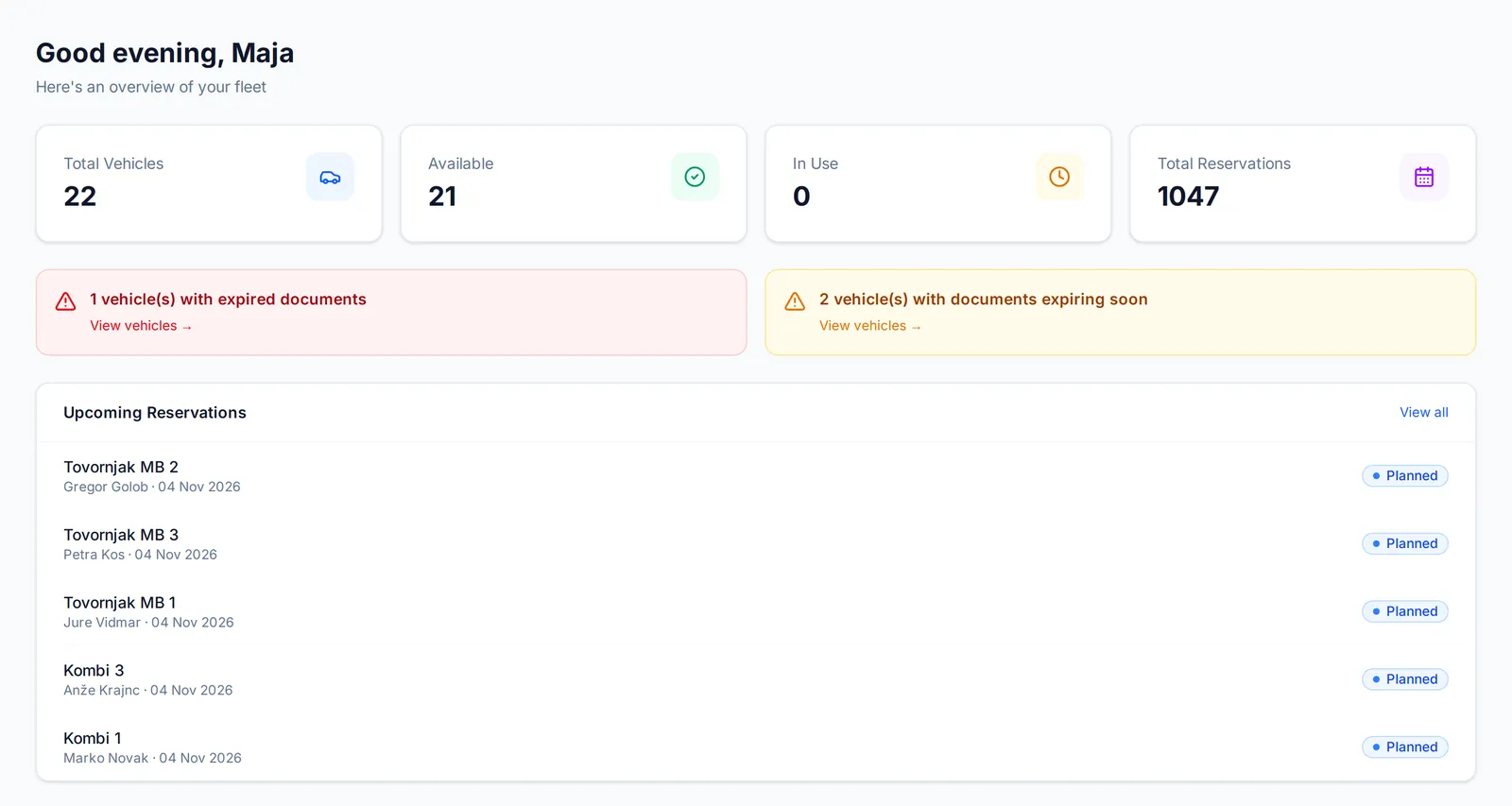
The dashboard shows vehicles with expired documents and those whose documents expire soon.

Dashboard with vehicle document warnings and upcoming bookings

Reports for management and accounting

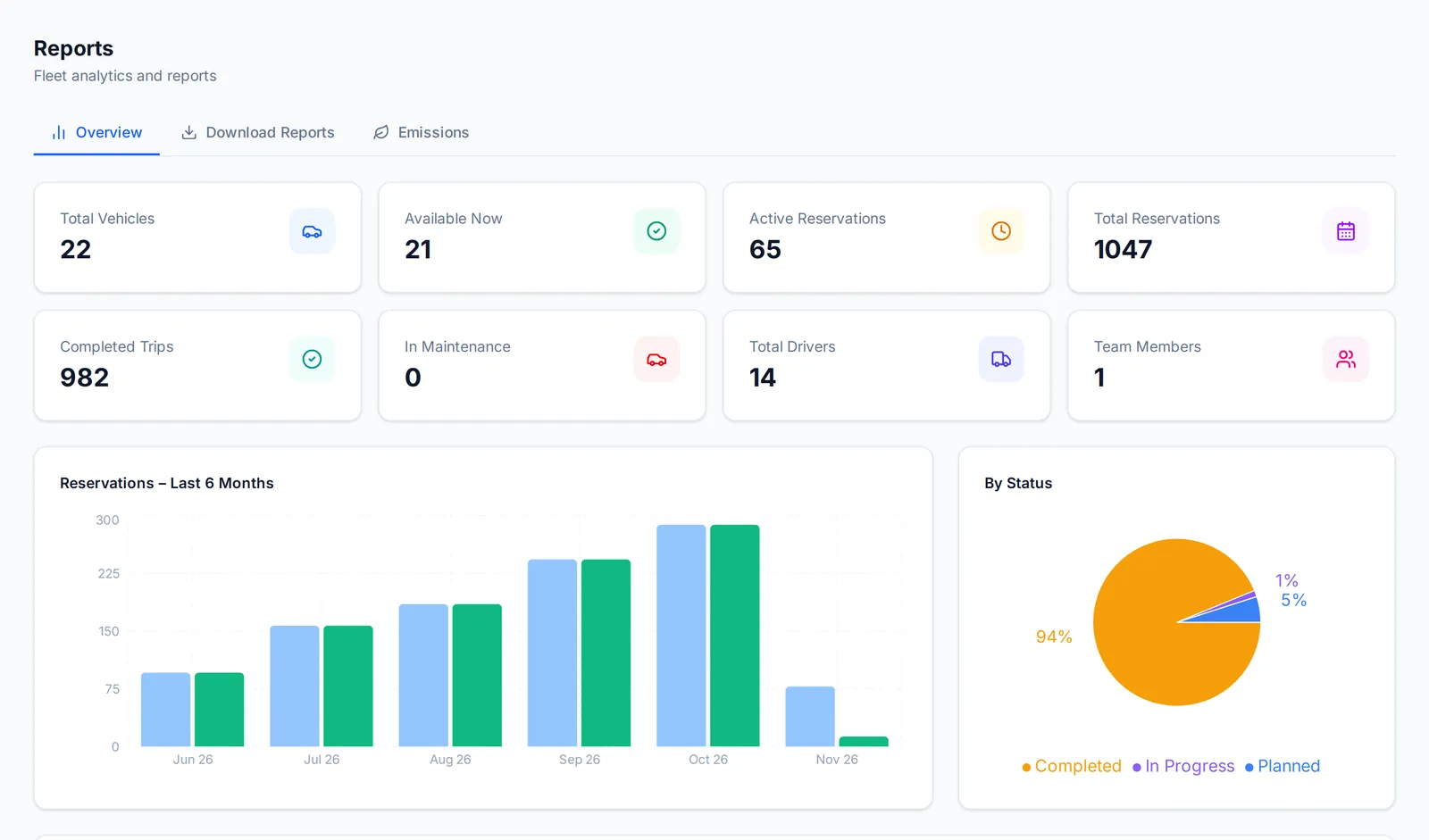
Bookings, completed routes, most-used vehicles and CO₂ per vehicle.

Reports: bookings per month, status and most-used vehicles

Import from Excel or CSV

Import vehicles, drivers, customers and projects from a spreadsheet. There is also a REST API.

Six languages

Slovenian, English, Croatian, German, Italian and Spanish. Each user picks their own.

Your data stays in the EU

Route calculation runs on our own servers, without paid external map services. Export your data any time.

Users, departments and roles

Every colleague has their own account; set access by department and role.

See it work

OptiRoute in one minute

Recorded in the real app with a demo company. No sound, with captions.

How to start

From spreadsheet to first plan in a week

  1. A 30-minute demo

    We show the app on your case: how many vehicles, how many deliveries, how you plan today.

  2. We import your data

    Send us a spreadsheet with vehicles, drivers and customers. We do the import and setup.

  3. Free demo or a 30-day pilot

    Try the demo with 1 vehicle yourself right away, or plan real routes with us for 30 days. Decide afterwards, with no obligation.

Pricing

Pay per vehicle. The price is public.

Pick one solution or both, separately for each vehicle: Fleet or Route optimisation. No setup fee, no hardware. Prices in EUR excluding VAT.

Solution 1

Fleet

€6per vehicle per month

For pool cars and vehicles without delivery routes

  • Vehicle register and warnings
  • Company-car booking
  • Travel orders
  • Projects, reports, CO₂
  • Users, departments, roles
Try it free

Calculate your price

Enter how many vehicles need each slot.

Your price

– per month

excl. VAT

    Try it free
    • Minimum bill €30 a month
    • Monthly plan no lock-in
    • Annual contract 1 month free
    • More than 50 route vehicles custom quote

    Examples: 1 van = €30, 3 vans = €78, 6 vans + 4 pool cars = €180 per month.
    Create a free demo account in the app yourself (1 vehicle with route optimisation, 1 route plan) and add slots any time in Profile → Subscription & billing.

    Why OptiRoute

    What you do by hand today, the app does for you.

    —TodayWith OptiRoute
    Morning route planA spreadsheet, a map and the dispatcher’s experience. It takes as long as it takes.Import the orders and click Calculate. Routes for every van in seconds.
    A change mid-dayPhone calls to drivers and a new plan from memory.Add or remove a vehicle or shipment and recalculate.
    Company carsA paper list or a shared calendar. Double bookings.One weekly schedule. An overlapping booking is rejected.
    Vehicle documentsYou notice the expired insurance when it’s too late.A warning 30 days ahead. Vehicles with expired documents can’t be booked.
    Travel ordersWritten by hand and retyped at month-end.Created from the booking. Km per project is one CSV export.

    To be honest

    What OptiRoute doesn’t do (yet)

    We’d rather tell you now than surprise you after you sign.

    • Live GPS tracking

      OptiRoute plans before the trip; it doesn’t track during it. If you already have GPS, keep it: each system does its own job.

    • A dedicated driver app

      Drivers get the route as a PDF or open it in Google Maps. No new account or app needed.

    • SMS notifications to customers

      Automatic arrival-time messages for your customers aren’t available yet. You see the arrival time and can pass it on.

    Who is behind OptiRoute

    Made in Slovenia

    OptiRoute was designed and built by a full-stack engineer with 10 years of experience and a strong GIS background.

    FAQ

    What people ask us most

    Do we need a GPS device or other hardware?

    No. OptiRoute runs in the browser, on a computer or phone. If you already have a GPS provider, keep it.

    How do drivers get their route?

    As a PDF, or with one click in Google Maps on their phone. They don’t need a special app.

    How does our data get into OptiRoute?

    Import vehicles, drivers, customers and projects from Excel or CSV. At the start, we convert the orders from your ERP for you. There is also a REST API.

    Where is our data?

    On servers in the EU. Route calculation runs on our own servers, without paid external map services. The data stays yours and you can export it at any time. Details are in the privacy policy.

    Is the travel order compliant?

    The travel order contains the driver, vehicle, route, time and kilometres from the booking. Check it with your accountant; if you need an extra field, tell us.

    Is there a lock-in?

    The monthly plan has no lock-in and can be cancelled at the end of any month. With an annual contract you pay 11 months for 12.

    Can I try it for free?

    Yes. Create a free demo account in the app yourself, with 1 vehicle with route optimisation and 1 route plan. For more slots, send a request from Profile → Subscription & billing and we’ll get in touch. For a serious trial on your own data we also run a 30-day guided pilot.

    How do I change the number of vehicles?

    Add slots yourself at any time in Profile → Subscription & billing; the sliders show the price, and new slots are billed from the next month. Decreases go through support once a slot has been billed for at least one full month (on an annual contract, at renewal). You can move route optimisation to another vehicle at any time.

    Which languages?

    Slovenian, English, Croatian, German, Italian and Spanish. Each user chooses their own.

    What is the maximum fleet size?

    One route plan can hold up to 500 stops. For more than 50 route vehicles we prepare a custom quote.

    Demo

    Try it on your own routes.

    Create a free demo account and try OptiRoute on your own data.

    Free demo

    A free demo account with 1 vehicle with route optimisation and 1 route plan. No card needed.

    Create a free demo account